
Managing inventory space in Mystery Town – Merge & Cases was one of the biggest challenges I faced when I first started playing.
Like many players, I struggled with overloaded inventory, slow progress, and wasted resources. Over time, through real experience and trial-and-error, I learned the best ways to optimize my space, stay organized, and enjoy the game more.
In this personal guide, I’ll walk you through simple, easy-to-follow strategies that helped me—coming from a beginner’s perspective—to stay ahead in the game, free up inventory, and make smarter decisions.
What You’ll Learn in This Guide
- How to manage inventory space effectively
- Practical tips I use every day
- When and how to expand your inventory
- Best practices to avoid clutter
- FAQs from real player concerns
- Official resources if you decide to register or contact support
Why Inventory Space Matters in Mystery Town – Merge & Cases
Inventory space is central to progress in the game because:
- You need space to store mergeable items
- It directly affects your game pace
- More space = higher rewards
- Prevents wasted materials
If you don’t manage it right, you’ll constantly stop and clean up—which kills momentum and fun.
My Experience: From Cluttered Inventory to Organized Success
When I started playing Mystery Town, my inventory was a mess:
- I collected everything I saw
- Didn’t merge items early
- Kept useless duplicates
- Was always full
This led to slow progress and frustration. That changed when I started using smart strategies (listed below), and now I can play longer with fewer interruptions.
How I Manage Inventory Space Mystery Town – Merge & Cases (Step-by-Step)
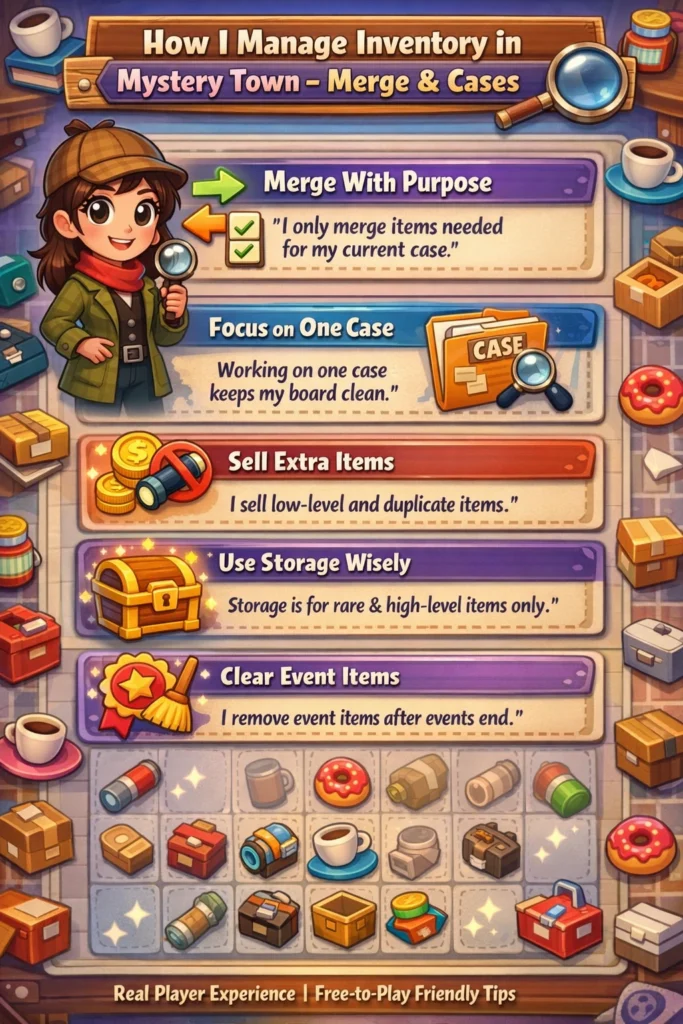
1. Regular Cleanups Are Essential
What I do weekly:
- Delete items I don’t need
- Merge smaller items into bigger ones
- Discard duplicates once their use expires
This helps me keep space free without losing progress.
📌 Tip: I schedule inventory cleanups the same time every week so I don’t fall behind.
2. Prioritize What You Keep
Before picking up an item, I ask:
- Will this item be used soon?
- Is it essential for a current task?
- Is it part of a merge combination?
If the answer is “no,” I skip or later delete it.
3. Use Merges to Free Space Faster
Merging is the #1 way to save space. Instead of keeping 10 small items, merge them into 1 bigger one.
Example:
- 10 Logs → 1 Big Log
- 8 Small Keys → 1 Master Key
Merging not only saves space but also speeds up future merges.
4. Only Upgrade Inventory When Necessary
As you level up, the game allows you to expand inventory. But this should be strategic, not rushed.
💡 My rule:
I expand only when I’m at least 80% full and I have materials that matter.
Why? Because early expansions are costly and often unnecessary. Save coins and gems for upgrades that truly matter.
5. Always Follow Your Daily Tasks
Daily tasks guide you toward necessary merges—this keeps your inventory from filling with random items.
Tasks also give rewards you actually need, eliminating clutter and unnecessary holding patterns.
6. Use Temporary Storage (If Available)
Some versions of the game let you store items temporarily. I use this:
✅ For items I WILL need soon
❌ Not for junk or items I will never use
Only store what’s meaningful so your main inventory stays tidy.
Quick Inventory Management Checklist
| Task | Do It? |
|---|---|
| Merge small items | ✔️ Daily |
| Delete unused items | ✔️ Weekly |
| Expand only when necessary | ✔️ Strategic |
| Use storage wisely | ✔️ Yes |
| Stockpile junk | ❌ No |
Recommended Inventory Rules (Personal System)
Here’s the exact system that works for me:
🟡 Rule 1: Never let inventory exceed 80%
This avoids auto-locks and slowdowns.
🟡 Rule 2: Merge everything you can immediately
No hesitation.
🟡 Rule 3: Only keep what is part of an active quest
If not active → delete.
🟡 Rule 4: Expand only at milestones
Only when space block is almost full.
📌 Official Support, Registration & Useful Links
Although Mystery Town – Merge & Cases is mainly a casual mobile game, it does have official support channels if you run into issues or want to register a support ticket.
Where To Get Official Help
- Official Website: (Note: game may be listed on developer/publisher site)
- In-Game Support: Open Settings → Help → Contact Support
- App Store Listing: Go to the store listing (Google Play / App Store) and click “Developer Contact”
- Social Media: Official Facebook or Twitter pages often share updates
Time Required to Improve Inventory Skills
Improving inventory space management isn’t instant—but here’s what I found:
| Stage | Estimated Time |
|---|---|
| Beginner Cleanups | 1–2 weeks |
| Efficient Merging | 2–4 weeks |
| Strategic Expansion | 1–2 months |
Don’t rush! Better long-term habits beat short-term fixes.
Common Mistakes to Avoid
1. Collecting Everything Without Thought
This is the #1 reason inventory gets full. Only collect what’s useful.
2. Merging Too Late
The longer you wait, the more space gets wasted.
My tip: Merge immediately when possible.
3. Expanding Too Quickly
More space feels good, but it leads to bad habits. Fill what you already have first.
Final Words: Keep It Simple, Smart & Strategic
Managing inventory in Mystery Town – Merge & Cases doesn’t have to be stressful. With the steps I shared:
✔️ You’ll make better decisions
✔️ Free more space
✔️ Progress faster
✔️ Enjoy the game more
Inventory space is not just a game mechanic—it’s a habit. And once you develop the habit of smart merging and cleanup, the game becomes smoother and more fun.
If you have any questions or want to share your own inventory tips, drop them below! 💬
Happy merging! 🔄🧩
Frequently Asked Questions (FAQ)
Why does my inventory fill up so fast?
Because you collect items faster than you merge or delete them. Focus on regular organization.
Should I ever save items for later?
Only very specific quest items. Otherwise, it’s better to delete them.
Is expanding inventory worth the cost?
Yes — but only when you’re close to capacity and need that extra space to keep progressing.
Can inventory affect my game progress?
Yes. A full inventory blocks new items and slows you down.
Where can I get official help if I’m stuck?
Use in-game support, app store contact, or official social media channels.